Vercel Schedules vs Cron Jobs for programmatic SEO jobs
How Vercel Schedules differ from legacy Cron Jobs, how to migrate vercel.json safely, and which target to use so sitemap, revalidation and IndexNow jobs retry.
 Maciej WiatrRead as markdown
Vercel moved Cron Jobs to legacy status on 5 November 2026, when it put Schedules into public beta. For a programmatic SEO site, the vercel schedules vs cron jobs question has two parts. Moving the config over is small. The bigger decision is which target each SEO job runs on: a route, a private function or a queue topic. That choice decides whether a failed sitemap rebuild, revalidation batch or IndexNow submit gets retried or is lost without a trace. Everything below comes from Vercel’s docs, checked in November 2026. Schedules is in beta, and the docs warn that “Behavior, APIs, and limits may change before general availability.”
Vercel Schedules vs Cron Jobs: what is the difference?
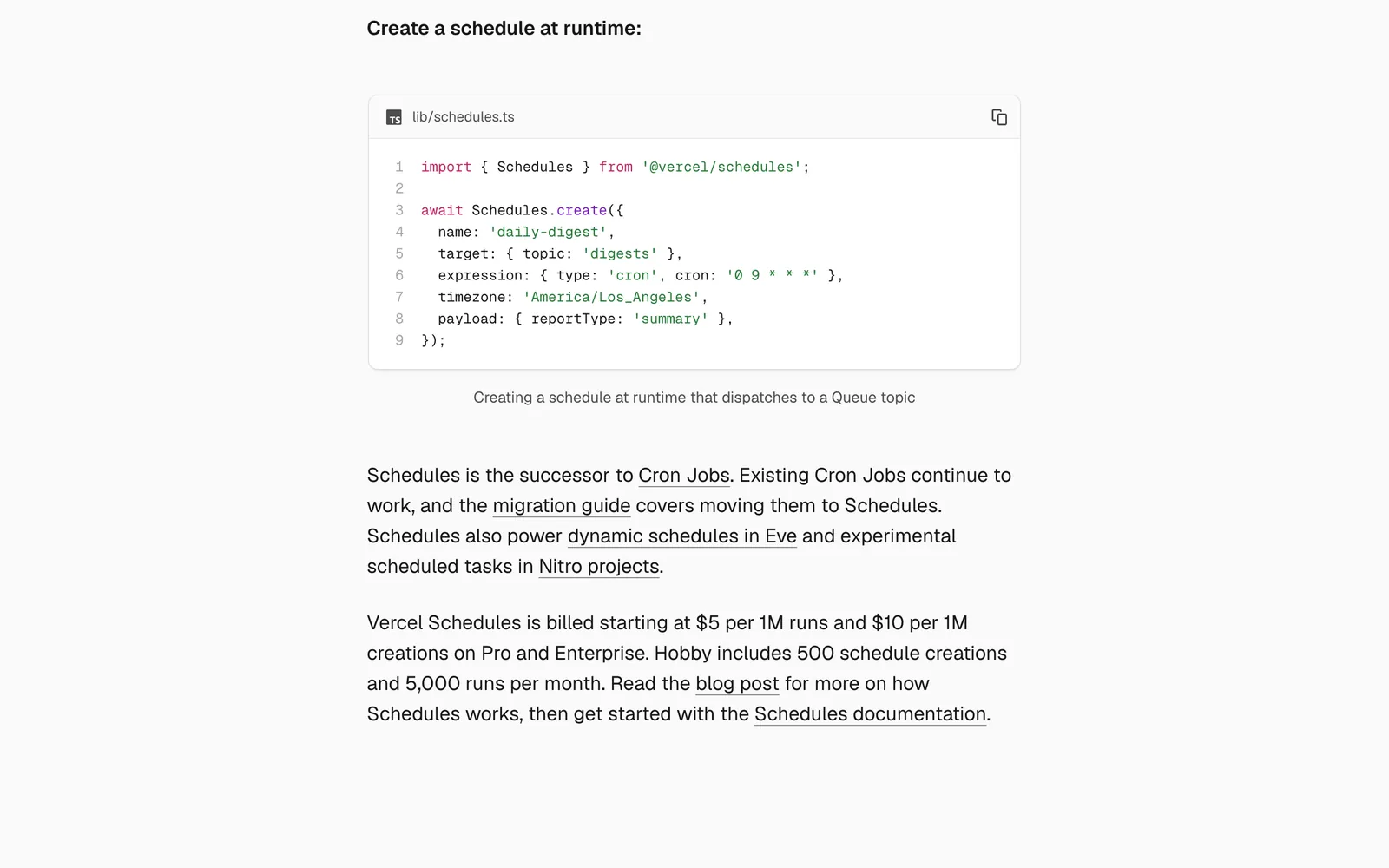
Schedules can run on a cron cadence or once at a set time. A schedule can call a path, run a private function or publish to a Vercel Queue topic (Schedules overview). This table combines Vercel’s own comparison with the limits page, the concepts page and the legacy Cron pricing page, as of November 2026.

| Cron Jobs (legacy) | Schedules (beta) | |
|---|---|---|
| Targets | HTTP GET to a public path | GET or POST to a path, a private function, or a queue topic |
| Timezone | UTC only | Any IANA timezone per schedule, default UTC, DST followed |
| Environments | Production only | Production, Preview branches, custom environments |
| Timing | Pro/Ent: within the scheduled minute | Jitter window of 1 to 15 min (Pro/Ent default 1) |
| Hobby frequency | Once a day, ±59 min | Every 15 min, fixed 15 min jitter |
| Limits | 100 per project, all plans | 1,000 / 10,000 / 100,000 per team (Hobby / Pro / Ent) |
| Hobby caps | None listed beyond once a day | 100 static per deployment, 5,000 runs and 500 creations per period |
| Pricing | No extra charge beyond functions | Pro/Ent: $5 per 1M runs, $10 per 1M creations, plus target usage |
| Retries | None | Queue topic targets only |
| Execution history | Function logs only | Per schedule, dashboard and CLI |
| Pause / run now | One project-wide switch | Per schedule, no redeploy |
| One-time and runtime-created | No | Yes, queue topic target only |
The $5 and $10 figures come from the changelog. I could not find how many runs Pro includes before charges start, so treat that as undocumented. History retention is also undocumented on the official pages.
Do I have to migrate my vercel.json crons to Schedules?
Not yet. The changelog says “Existing Cron Jobs continue to work.” The migration guide says Cron Jobs “will be migrated to Schedules in the future.” No date is published. Migrating early buys you preview testing, per-schedule history and queue retries. If you are on Pro and need an exact minute, staying on Cron Jobs for now is reasonable.
How do I migrate a Vercel cron job to Schedules without changing route code?
Here is a nightly sitemap cron before the move:
{
  "crons": [
    { "path": "/api/sitemap-regen", "schedule": "0 3 * * *" }
  ]
}
And after:
{
  "schedules": {
    "sitemap-regen": {
      "path": "/api/sitemap-regen",
      "schedule": "0 3 * * *",
      "requestMethod": "GET"
    }
  }
}
Four details matter:
- Add
requestMethod: "GET". Path schedules default to POST (configuration reference). A GET-only route handler would stop working without it. - Delete the
cronsentry in the same deploy. The guide is blunt: “If you keep both, your route runs twice for each occurrence.” - Keep
CRON_SECRET. Path targets still receiveAuthorization: Bearer <CRON_SECRET>(handle-runs). - Leave out
timezoneto stay on UTC. If you add one, rewrite the cron expression to match.
Pick the name carefully. Renaming a schedule deletes it and creates a new one, which loses its history. Deploy with vercel deploy --prod, then check it with Run Schedule in the dashboard or vercel schedules invoke sitemap-regen.
Later you can move to a private function: wrap the handler in handleSchedule, give it a schedule/v1beta trigger as its only trigger, and swap path for function using the build-output identifier (api/cleanup, not api/cleanup.ts). One caveat for Next.js: the docs don’t show whether an App Router route.ts can carry that trigger. Run vercel build and check before you rely on it. Function targets also get no authorization header, so they don’t need the secret check.
Does Vercel Schedules retry failed runs?
Only queue topic targets do. For paths, “Vercel doesn’t retry a run if your route returns an error or times out.” Functions don’t retry either, and legacy Cron Jobs never did. Vercel’s advice: “If a failed run must be retried, target a queue topic.”
Queue messages live 60 seconds to 7 days, 24 hours by default. retryAfterSeconds defaults to 60, maxDeliveries defaults to unlimited, and there is no built-in dead-letter queue (Queues concepts). Two gotchas. Messages stick to the deployment that created them, so a broken old deployment can keep retrying for up to 24 hours after you roll forward. A delivery that times out is billed for the full maxDuration (Queues pricing). Set maxDeliveries on anything that calls an external API.
If runs fail with no visible cause, Vercel’s troubleshooting guide points to WAF custom rules and Attack Challenge Mode. A community user found that a geo-block rule had stopped their cron.
What are the limits on Hobby vs Pro?
The table covers frequency and counts. Two Hobby rules are easy to miss. When a Hobby team passes 5,000 runs in a billing period, scheduled runs are skipped until the next period. If a Pro team downgrades, any schedule that runs more often than every 15 minutes, or has jitter under 15, is deleted and “doesn’t come back when the team upgrades.”
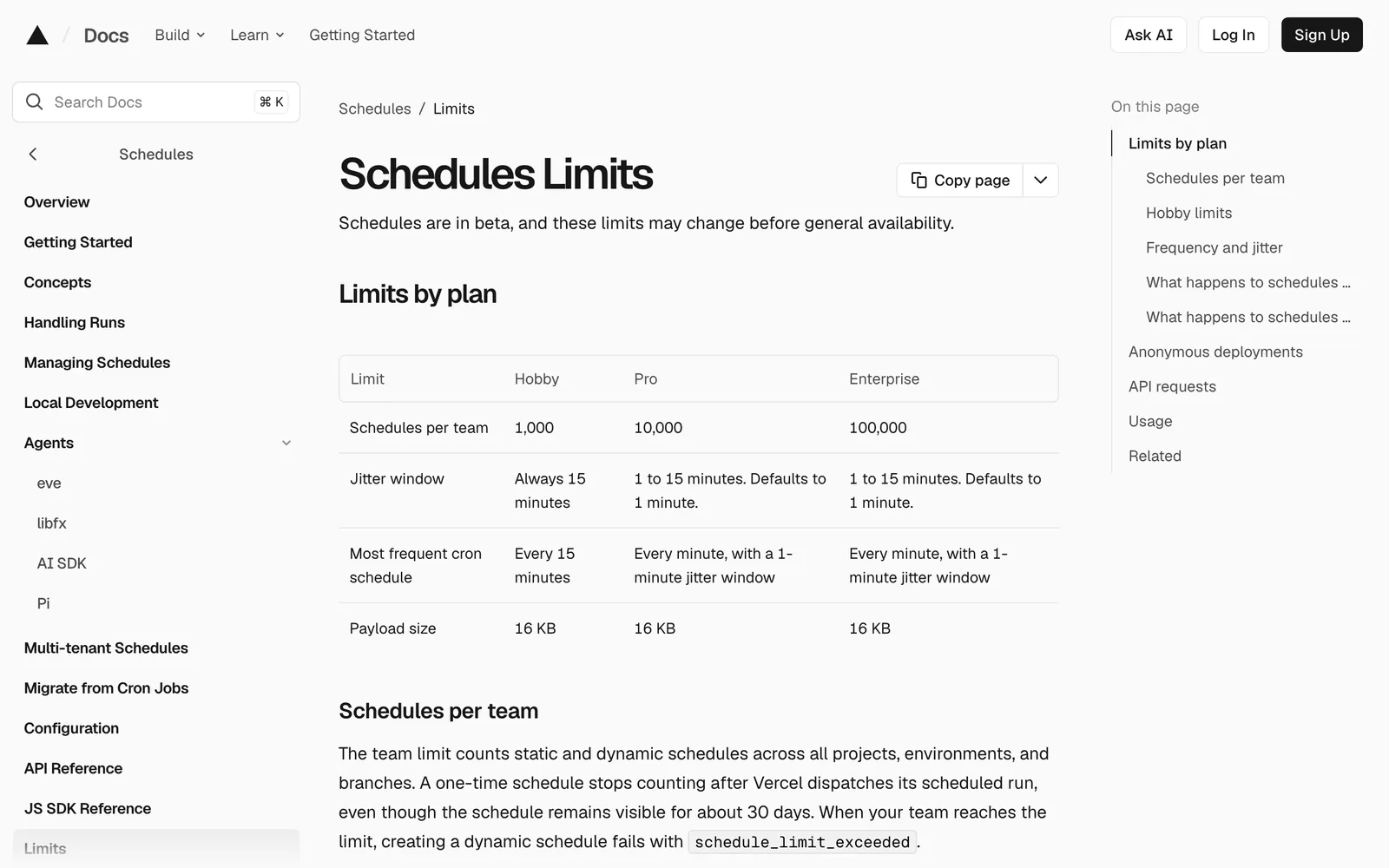
Also note that 5,000 runs is about 52 days of one schedule firing every 15 minutes. Two such schedules on Hobby will use up the cap before the month ends.
Can Schedules run on preview deployments?
Yes. Each Preview branch gets its own schedules, and they start inactive (manage docs). This replaces the workaround of pointing QStash or GitHub Actions at preview URLs (community thread).

vercel schedules invoke sitemap-regen --git-branch feature-x
vercel schedules enable sitemap-regen --git-branch feature-x --for 1h
vercel schedules invoke sitemap-regen --local
The last command runs against vercel dev (local development). My own rule, which is not from Vercel: SEO jobs should do nothing that leaves the deployment unless VERCEL_ENV === 'production'. A preview branch that submits URLs to IndexNow shares them with every participating engine.
Which target fits each programmatic SEO job?
This is my mapping, built on the retry facts above. The diagram shows the split: light jobs on a path, jobs that must not fail silently on a queue.
flowchart TD
    A[Sitemap schedule] --> B[Path target]
    B --> C[Write sitemap files]
    D[Changes schedule] --> E[Revalidate topic]
    D --> F[IndexNow topic]
    E --> G[Chunked revalidatePath]
    F --> H[POST 10k URLs]
    G --> I[Retry on failure]
H --> I| Job | Target | Why |
|---|---|---|
| Sitemap regen | Path (or function) | Idempotent. The next run repairs a missed one |
| revalidatePath batches | Queue topic, consumer route | Needs retries and maxConcurrency |
| IndexNow submit | Queue topic, consumer route | 429s and 5xx need retries |
| Full rebuild via deploy hook | Path | One call, easy to rerun by hand |
Sitemap regen. Google caps each sitemap at 50,000 URLs or 50 MB uncompressed, ignores priority and changefreq, and uses lastmod only if it is “consistently and verifiably accurate” (Google). Write lastmod from your data’s real update time. Don’t ping Google afterwards: the endpoint was deprecated in June 2023 and returns 404. More on index splits is in the Next.js programmatic SEO guide.

revalidatePath batches. In a Route Handler, revalidatePath marks a path, and the page regenerates “on the next visit.” A batch of 10,000 paths is 10,000 invalidations. It does not mean 10,000 renders or 10,000 database reads right away. Passing /product/[slug] with 'page' won’t regenerate every product at once. Paths are capped at 1,024 characters, and with rewrites you pass the destination path. Use a consumer route, since revalidatePath only runs inside Next.js server code.

IndexNow. Up to 10,000 URLs per POST, and only added, updated or deleted URLs (IndexNow docs). A 202 means key validation is pending, 403 is a bad key, and 429 means too many requests. Google tested the protocol in 2021, and I found no current statement that it uses it, so measure Google crawling through your indexing reports instead.

Why does my schedule run twice, and how do I make SEO jobs idempotent?
Vercel lists the causes: duplicate deliveries it “can’t rule out,” catch-up runs after delays (an every-minute schedule delayed two hours fires up to 12 times), slow runs overlapping because “a slow run doesn’t delay the next one,” and leftover crons entries. The fix is the execution ID, which “stays the same for every delivery of that occurrence.” Path routes read it from ce-id, functions from metadata.executionId, and queue consumers from message.executionId.
export async function GET(req: Request) {
  if (req.headers.get('authorization') !== `Bearer ${process.env.CRON_SECRET}`) {
    return new Response('Unauthorized', { status: 401 });
  }
  if (process.env.VERCEL_ENV !== 'production') return new Response('skipped');

  const runId = req.headers.get('ce-id');
  if (!runId || (await alreadyProcessed(runId))) return new Response('duplicate');

  const since = await lastSuccessfulRun();      // catch up, don't assume one interval
  await regenerateSitemaps({ changedSince: since }); // overwrite files, never append
  await markProcessed(runId);
  return new Response('ok');
}alreadyProcessed, lastSuccessfulRun and markProcessed stand for whatever store you already have. Add a lock if a run can take longer than the interval, and use ce-vssscheduledat to return early on stale catch-up runs.
When not to use Schedules
- You are on Pro and a job must start inside an exact minute. Cron Jobs still do that, and jitter does not.
- Your pipeline already runs on an external queue or orchestrator with retries. Adding a second scheduler adds a second place to debug.
- You are on Hobby with several high-frequency jobs. The 5,000-run cap will skip runs.
- You can’t live with beta changes to behavior, APIs or limits on jobs your index depends on.
For a site with hundreds of thousands of templated pages, the change that matters is retries. Sitemap jobs can stay on a path. Anything that pushes changed URLs to caches or search engines should go through a queue with an idempotent consumer.