Vercel Runtime Cache migration: costs, limits and code changes
What changes when Vercel moves Data Cache to Runtime Cache: per-unit billing, regional eviction, purge rate limits, code fixes and a pre-migration checklist.
 Maciej WiatrRead as markdown
The move from Data Cache to Vercel Runtime Cache needs no code changes if you cache with fetch and force-cache or with unstable_cache. On a programmatic site with 200,000 templated pages, three other things change: cost, storage and behaviour. Reads and writes that used to be free are now billed. The cache is regional and evicts entries when it fills up. Purges are rate limited. This post lines up the before and after, shows the few code changes worth making, and ends with a checklist to run before you migrate. All Vercel facts below were checked as of November 2026.
When is the Data Cache move to Vercel Runtime Cache planned?
Vercel’s changelog from Oct 30, 2026 sets out the schedule:

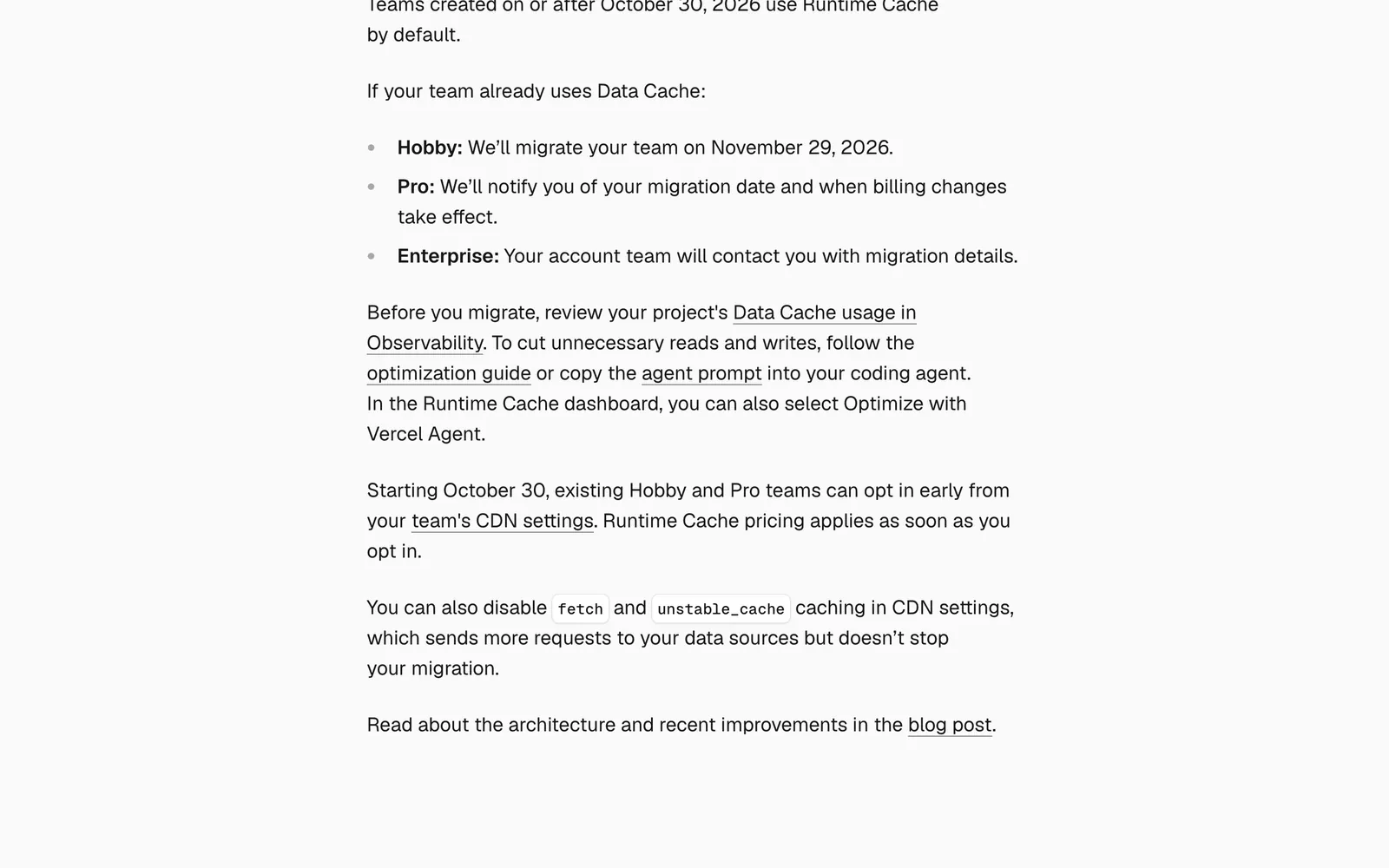
- New teams created on or after Oct 30, 2026 use Runtime Cache by default.
- Existing Hobby teams migrate on Nov 29, 2026.
- Existing Pro teams have no date yet. Vercel says it “will notify” them of the migration date and of when billing starts.
- Enterprise teams hear from their account team.
Can I opt in early?
Yes. Hobby and Pro teams can opt in from the team’s CDN settings. The changelog warns that “Runtime Cache pricing applies as soon as you opt in.” The same settings let you turn off fetch and unstable_cache caching altogether. That sends more traffic to your data sources and does not stop the migration.
Before and after: fetch caching, revalidateTag and ‘use cache’
| Data Cache (before) | Runtime Cache (after) | |
|---|---|---|
fetch with force-cache, unstable_cache | Cached, unbilled | Cached, billed per 8 KB unit, no code change |
| Storage on Pro | One team-wide pool | Own allocation per project and environment, 8× the old pool |
| When full | Eviction | Least-recently-used eviction, per region |
revalidateTag | Works | Works, rate limited at 200 calls/s per team on Pro |
Plain 'use cache' | In memory per instance | Unchanged: in memory, not shared on serverless |
'use cache: remote' | n/a | Stored in Runtime Cache, reset on every deploy |
| First hour after migration | n/a | Cold: entries repopulate from live traffic |
Sources: the Runtime Cache docs and the Data Cache for Next.js docs. The changelog confirms Data Cache was “previously unbilled”.
One detail matters for long-tail pages. The Data Cache docs say Vercel repopulates fetch, unstable_cache and use cache: remote entries “from live traffic, so expect some additional cache misses and backend requests at first.” It only carries over entries written with getCache.
Do I need to change any code for fetch with force-cache or unstable_cache?
No. The changelog says these “will switch over on every version without code changes.” What you need to plan for is the bill and the cold start, not the code.
Why does ‘use cache’ work locally but not on my Vercel deployment?
Plain 'use cache' keeps entries in memory. Locally you run one long-lived process, so entries get reused. On Vercel, the Next.js docs explain that memory is not shared between serverless instances and is usually destroyed after a request. Requests for dynamic content land on different instances, so the cache rarely hits.

Next.js issue #85240 was closed in August 2026 with this explanation. It points to 'use cache: remote', which needs cacheComponents: true and stores entries in Runtime Cache. For a finite set of params, you can also prerender them with generateStaticParams. Runtime prefetching with params arrived in Next.js 16.3+.

Do you need the remote directive? Only for request-time data that is worth sharing across instances. Remember that every read and write it makes is billed, and that its entries reset on each deploy.
Will my cached data survive a new deployment?
It depends on how the entry was written, according to the Runtime Cache docs:
getCachewith your own keys: yes.fetchwithforce-cache, andunstable_cache: yes.'use cache: remote': “not today”. Its keys include thebuildId, or thedeploymentIdwhen Skew Protection is on.
TTL and tag changes in code “aren’t reconciled between deployments.” To change how existing entries behave, purge them or change the cache key.
This matters if you deploy often. Vercel’s caching antipatterns guide describes a team whose ISR hit ratio fell to about 12%. During a three-day deploy freeze it climbed toward 98%, with no change in traffic or code.
Does revalidateTag still work the same, and what are the rate limits?
revalidateTag and revalidatePath still work through Next.js. The one-argument form of revalidateTag is deprecated in Next.js 16. Use revalidateTag(tag, 'max') to serve stale content while it revalidates, or { expire: 0 } to expire immediately.
The new constraint is the purge rate limit:
| Plan | Limit |
|---|---|
| Hobby | 50 calls/s per team |
| Pro | 200 calls/s per team |
| Enterprise | 500 calls/s per project |
The limit counts calls, not tags, and is averaged over 30 seconds. Going over returns HTTP 429 with a retry-after header, and nothing is purged. The @vercel/functions reference shows that invalidateByTag() accepts a string[], so many tags cost one call. One catch: entries written with getCache need expireTag, because revalidateTag does not touch them.
How do Runtime Cache and ISR interact?
They are separate layers, billed separately at the same unit prices. The Runtime Cache docs say to “use the same cache tag for both to manage them together.” The @vercel/functions reference says Runtime Cache tags “will not apply to ISR pages.”
My reading is that the second statement refers to getCache entries, while Next.js-written entries are still invalidated through revalidateTag. I’m not certain of that, so test it before you rely on it. Change one record, call revalidateTag with the shared tag, and check that both the data and the rendered page update.
Also check your layouts. Vercel’s optimization guide notes that a short revalidate on a fetch in a shared layout sets the ISR interval for every route under it.
How much will Vercel Runtime Cache cost for hundreds of thousands of pages?
As of November 2026, the Runtime Cache docs and regional pricing list these rates:
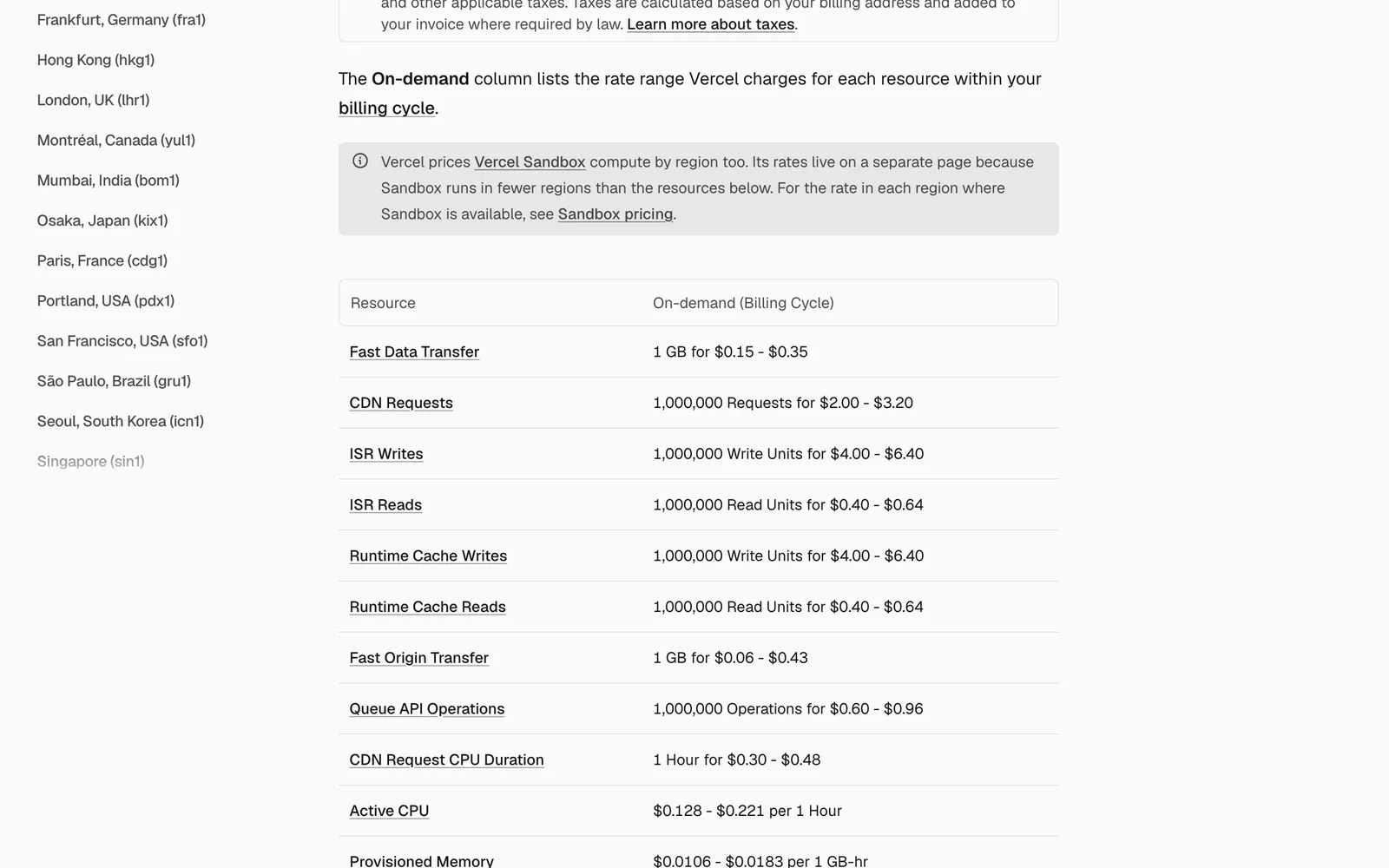
- Reads: $0.40 to $0.64 per 1M read units.
- Writes: $4.00 to $6.40 per 1M write units.
One unit is 8 KB, rounded up per operation, so a 100 KB entry costs 13 units.
Plan allowances work differently. Hobby includes 1M read units and 200K write units per month. When you go over, the cache pauses for the rest of the period instead of billing you. Pro usage comes out of the $20 monthly credit first, then on-demand rates apply.
The formula:
read units  = reads  × ceil(entry KB / 8)
write units = writes × ceil(entry KB / 8)
cost        = units / 1,000,000 × regional rate
Here is an illustration with assumptions, not a measurement. Take 200k pages with 3 entries of 10 KB each, so 2 units per entry, all revalidated daily. That is 18M writes and 36M write units a month, or about $144 at iad1 rates. Reads from 2M renders come to 12M units, about $4.80.
On a programmatic site, revalidation frequency drives the bill, not page views. Write units cost 10× read units.
To get your own inputs:
- Take read and write counts from the Usage page.
- Take entry sizes from the “Entry Size” column of the Observability Entries table.
- Divide reads by function invocations to get reads per request.
The code changes worth making
Tag per page, not per template. The antipatterns guide describes a system with about 65M writes against 48M reads over two weeks. Bare content-type tags were purging everything of one kind. The fix was entity tags such as product:${slug}.
// before: one edit purges every provider page
next: { revalidate: 86400, tags: ['providers'] }

// after
const res = await fetch(`${API}/providers/${slug}`, {
  cache: 'force-cache',
  next: { revalidate: 86400, tags: [`provider:${slug}`] },
});
Move request-time data off plain ‘use cache’. Switch to 'use cache: remote' or keep it in unstable_cache. Prefer unstable_cache if you deploy several times a day, because its entries survive deploys.
// next.config.ts
export default { cacheComponents: true };

// lib/provider.ts
export async function getProvider(slug: string) {
  'use cache: remote';
  return db.provider.findUnique({ where: { slug } });
}
Batch and protect purges. The same guide describes an unauthenticated CMS webhook where one call could trigger 150 seconds of invalidation. I’d dedupe tags, pace the calls under your plan’s limit, and require a secret:
import { revalidateTag } from 'next/cache';

const PER_SECOND = 150; // under Pro's 200/s; use 40 on Hobby

export async function POST(req: Request) {
  if (req.headers.get('authorization') !== `Bearer ${process.env.PURGE_SECRET}`) {
    return new Response('Unauthorized', { status: 401 });
  }
  const { slugs } = (await req.json()) as { slugs: string[] };
  const tags = [...new Set(slugs.map((s) => `provider:${s}`))];
  for (let i = 0; i < tags.length; i++) {
    revalidateTag(tags[i], 'max');
    if ((i + 1) % PER_SECOND === 0) await new Promise((r) => setTimeout(r, 1000));
  }
  return Response.json({ purged: tags.length });
}
What it changes for programmatic SEO
Long-tail pages are the ones LRU eviction removes first, and crawlers are often the only visitors to them. A GitHub discussion from Feb 2026 describes a 20k-product catalog stuck at a 50% hit rate. Vercel staff replied that the Pro pool was “128MB across all projects,” a figure the docs never stated.
The new per-project allocation is 8× the old pool, and Vercel’s launch post says Enterprise miss rates roughly halved within a day after storage grew. For indexing, that should mean fewer slow cold renders when Googlebot works through the tail. For measurement, put deploy markers next to your crawl stats. I cover ISR and sitemaps at this scale in Programmatic SEO in Next.js, and tracking in Measurement.
When not to use it
The Next.js docs advise skipping remote caching when:
- the operation already finishes in under 50 ms
- keys are mostly unique per request
- the data changes every few seconds or minutes
I’d add two cases of my own. Don’t opt in early on Pro while your write units are unknown. And don’t put large grouped entries in the cache if one item in them changes often: rewriting a 500 KB entry costs 63 write units.
Pre-migration checklist
Observability (Observability → Runtime Cache) has a few traps. Pro keeps only 1 day of history. The hit-rate chart counts only fresh hits, while the table column also counts stale reads. Observability counts operations, but billing counts 8 KB units. With those in mind:
- Record reads and writes by project and region from the Usage page, which keeps longer history.
- Note the fresh hit rate from the chart, not the table column.
- List top tags by writes (needs Observability Plus) and flag any tag with more writes than reads.
- Check entry sizes and eviction activity, and flag anything near the 2 MB item limit.
- Compare misses against deploy markers.
- Replace template tags with entity tags.
- Switch to the two-argument
revalidateTag(tag, 'max'). - Pace and authenticate purge webhooks.
- Test whether one tag invalidates both the data and the ISR page.
- Estimate write units with the formula above before Vercel’s billing date for your plan.